Translate

Showing posts with label Computer and Technology. Show all posts

Monday, September 8, 2014


Google's Chromecast promised to be an extremely low-cost way to turn any TV with an HDMI port into aover an year ago in the US it has yet to hit the Indian shores officially.
smart TV, letting you stream content to the dongle from your smartphone, tablet or any other device running Chrome. While the device launched
Yes, Chromecast is available through importers at Rs.3,500 or more online, but that's a lot more than the $35 (approximately Rs.2,100) that it costs in the US, which makes the main USP of the product - it's low price - redundant. A new product called the TeeWe, made by hardware startup Mango Man Consumer Electronics, aims to fill that gap, and the company's HDMI dongle is priced well at Rs.2,399, with a pre-order price of Rs.1,999.
You can stream content to the TeeWe from Android and iOS devices, with desktop clients for Mac and PC becoming available by the time the units reach customers.
We used the Teewe for over a week to see how well it works and how it measures up to Google's Chromecast.
Design
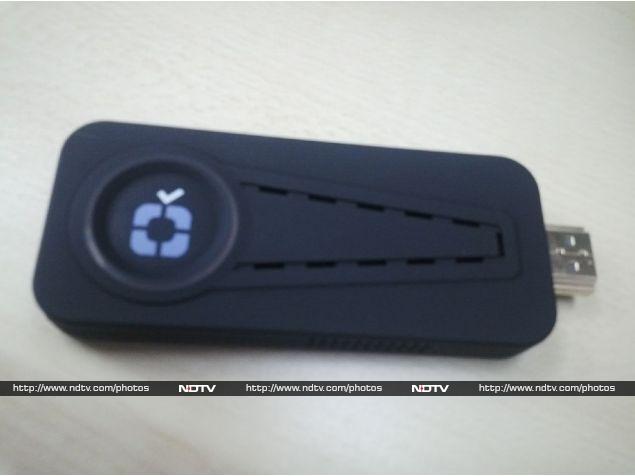
Given how many Indian products often struggle with design, we were certainly pleased with the look and finish of the TeeWe. It is very similar to the Chromecast in size, though a little bulkier. Instead of the key-like shape of the Chromecast, the TeeWe is a smooth rectangle - it's perfectly flat but the plastic body doesn't have sharp edges either. The HDMI jack sticks out along one of the smaller sides, and there's a Micro-USB port along the long side at the other end of the stick. This is used to connect the dongle to a power supply - the included wall adapter (Chromecast doesn't come with one) has a long cable so it wasn't very inconvenient to use.
The all plastic body doesn't really feel like a premium product, but it doesn't look cheap or tacky either. When you consider the price of the product, we think that Mango Man's design work is up to the mark.
teewe_detail_085214_105234_6456.jpg
Setup
Setting up the TeeWe is pretty straightforward. Connect the dongle to your TV's HDMI port, and connect the power. After that, follow on-screen instructions to set up the TeeWe's Wi-Fi.
To do this, you first connect your mobile device to the TeeWe-generated WiFi network, and use the connection to set up the TeeWe with your home Wi-Fi. Once this is done, you just select the content you want on the mobile device, and you can start streaming it to the TeeWe.
Features
The TeeWe is designed for entertainment - you can use it to stream local media (photos, music and movies) from your mobile or tablet to a TeeWe plugged into a big screen television without any trouble. You can also use it to stream video from the Web, controlled through the app on your phone or tablet.
The app is straightforward, with the different sections laid out in scrollable rows. You have YouTube videos, and a curated list of free content on the Internet to make it easy for people to find free Indian TV shows and movies. There are also rows for locally stored content, so you can push your songs and videos directly from your phone without needing Internet access, as long as the two devices are on the same Wi-Fi network.
What's missing right now is a screen-mirroring option. According to the TeeWe team, this wasn't something in the initial roadmap at all, but the feedback they've received so far means that it's something they want to add in the near future via over-the-air software updates.
Performance
The TeeWe was able to stream plenty of videos from YouTube smoothly, changing streams as soon as we tapped the icons on our mobile's screen. Playing local content was similarly easy and the playback was completely without any stuttering or lag.
To test the local playback, we tried a number of video samples - this included 720p and full-HD content, in popular formats like AVI, MP4 and MKV. Full-HD playback stuttered at times, but 720p worked flawlessly throught.
The TeeWe app is the only way to send media to the dongle and using the app itself is straightforward. On our Android device, the app found all the movies on the tablet but on the iPad, it was a little less useful because like most people, we store our local media in different apps. TeeWe can find locally saved videos only if they're saved in your device's Videos or copied directly to the TeeWee app, but that's an OS limitation every app must live with.
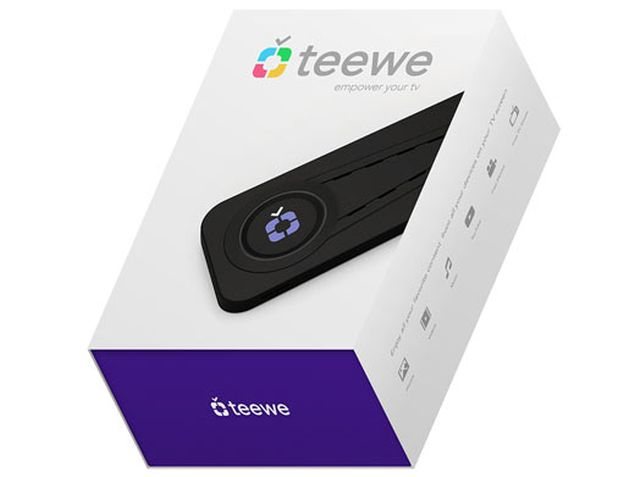
teewe_box.jpg
Verdict
If you're looking for a low-cost way to stream videos from the Internet or your smartphone/ table to the big screen, the TeeWe looks like a pretty good choice. The companion app is easy to use, and the actual streaming worked without any difficulties.
The catch is that there are a number of ways to bring this kind of functionality to your television without having to use a TeeWe. If you have a laptop, you can probably connect it directly to the television with a simple HDMI cable. If you have a game console like the Xbox 360 or PlayStation 3, then too you can share your videos over Wi-Fi quite easily. Not to mention other alternatives like HTPCs, Chromecast and indeed Apple TV.
However, all those options are either too expensive, inconvenient or suffer from a lack of portability. If you want something that can slip easily into your pocket and carried to a friend's house, the TeeWe is perhaps the best option officially available in India right now that doesn't cost a bomb.
So does that make the TeeWe better than the Chromeast? Not without the third-party support. As Google's official HDMI dongle, support for Chromecast has been integrated into a lot of apps on Android, and indeed iOS. If you have the Popcorn Time app on your Android device, for example, you can use it to download and stream movies directly to your TV using a Chromecast.
It is hard to imagine Popcorn Time adding support for Teewe unless Mango Man can somehow convince the developers to come on board. But the company doesn't seem too keen to do that, saying it wants to add Chromecast support to its own app instead, a move that indicates it's more keen to push its software instead of hardware.
While the Teewe may never get as popular as the Chromecast, it's still a solid choice for anyone looking to get started with streaming videos to the big screen.

Source>>>
Saturday, September 6, 2014


If you’ve been following the tech news, you probably know that Apple’s highly anticipated iWatch is
expected to make its debut Sept. 9, along with Apple’s new iPhone.
Based on the amount of hype this iWatch has generated, it could be the most important piece of consumer technology since the original iPhone launched in 2007, or the iPad in 2010.
But seriously: Why? What exactly will the iWatch be able to do? What will it look like? And more to the point: Why would Apple want to get into the wearables market, which, despite being loaded with a variety of offerings, isn’t nearly as robust as the smartphone market?
Below is a brief explainer about the iWatch, its raison d’être, and why Apple would want to even enter a market that’s still largely unproven. School is in session.
What’s an iWatch?In short, the iWatch is Apple’s long-rumored smartwatch that analysts and company watchers claim could put to bed all of those nagging rumors that Apple’s well of innovation has run dry.

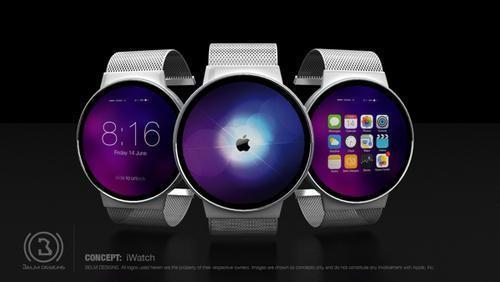
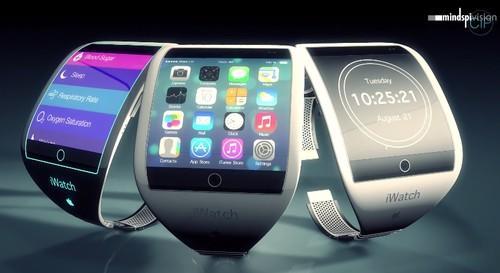
Artist's concept of the iWatch 
iWatch concept. (Belm Designs)

The watch itself is expected to feature a touchscreen and connect to your iPhone or iPad via Bluetooth and provide you with notifications from your favorite apps. So you’d be able to view messages from your phone without removing it from your pocket or walking across the room to retrieve it. It’s like having your smartphone screen on your wrist at all times.
Both The New York Times and The Wall Street Journal report that the iWatch will also have a near-field communication, or NFC, chip, which could be used to make wireless payments with the watch. To do so, you’d simply tap the iWatch on an NFC payment pad at a store’s checkout counter. The watch would then automatically pay for your items with money from the bank account you linked to the wearable. 
As a bonus, the iWatch is also expected to work as a kind of fitness and health tracker. You’ll also reportedly be able to track your steps via the watch’s built-in pedometer, see if you should slap on some sunblock via its UV monitor, and check out other fitness information through Apple’s upcoming HealthKit platform.
HealthKit?That’s right, HealthKit. Introduced at Apple’s Worldwide Developers Conference as part of iOS 8, HealthKit takes all the data from your disparate health and fitness apps and combines it into one convenient app on your iPhone’s home screen.
iPhone HealthKit app

That means you’ll be able to see your heart rate, the number of calories you burned in a day, how many hours you slept last night, your blood sugar, your cholesterol, and more.
HealthKit will also let your various fitness apps, like RunKeeper or MyFitnessPal, talk to one another and share your data to ensure that you get a clear picture of your overall health.
So why would Apple make an iWatch?The so-called “wearables” market is still in its infancy, but many tech analysts expect it to grow exponentially in the coming years. According to market research firm IDC, shipments of wearables will increase from 6.2 million in 2013 to 19.2 million by the end of 2014.

Artist's concept of the iWatch

As IDC’s Ramon Llamas notes, Apple is keenly aware of the huge numbers of apps downloaded from its App Store for the various fitness trackers and other wearables on the market. So why wouldn’t Apple want to get in on that itself?
iWatch concept. (Todd Hamilton)
There’s also the fact that the iWatch will be perfect for collecting anonymous data about its customers. That will give it, at the least, better information to sell more highly targeted ads.
“Wearables are the most intimate of devices,” Llamas explained. “These are things that you have on you nearly 24/7.
“There is a lot of information that Apple could collect about a user if they wear a watch,” he added. “There is a lot of gold in there to be harvested.”
Will it really be called the “iWatch”?Not necessarily! That’s just the name that tech watchers have given Apple’s smartwatch device, as a kind of shorthand. It could be called something else entirely.
OK, so what will the “iWatch” look like?Well, that’s the thing. There isn’t much known about how exactly the iWatch will look. Those renderings you see above are mere guesses, or fantasies, of Web artists. Unlike the iPhone 6, of which a new alleged prototype hits the Internet every day or so, no purported images of the iWatch have surfaced.
Our best guesses about how the iWatch will look come from Apple’s patent filings and reports citing unnamed sources. In February 2013, AppleInsider came across a patent Apple filed for a wearable device with a full-length screen that wraps around your wrist like a slap bracelet.

Line drawing from Apple's patent filing

In June, Reuters cited a source saying that the iWatch will have a 2.5-inch rectangular display that will be slightly raised above the watch’s band. Another report from Taiwan’s Economic Daily News claims that the iWatch will instead come in two screen sizes, 1.6 inches and 1.8 inches.
All of that is to say, the iWatch is still a pretty big mystery.
We’ll find out on Sept. 9 though, right?That’s the word on the street, yes. Multiple reports have indicated that Apple will unveil the iWatch along side the new iPhone 6. Unfortunately, other reports, including one from Re/code’s John Paczkowski, point to Apple holding off on sales of the iWatch until 2015.
What’s interesting is that we’ve seen neither hide nor hair of the iWatch yet. And in a world where new device designs, even those from Apple, are regularly leaked online, that’s quite an anomaly.
That likely means that the watch hasn’t gone into production, where it could be surreptitiously photographed and shared across the Web. That also jibes with rumors of production issues with the watch.
So what happens if the iWatch doesn’t debut on Sept. 9?I’ll eat my own shoes.
So stay tuned for our coverage of Apple’s big day, and get ready to see either the iWatch unveiled or a grown man eating his sneakers. Either way, it’ll be a fun show.
Email Daniel at dhowley@yahoo-inc.com; follow him on Twitter at @DanielHowley or on Google+ here.

BERLIN — One of the most common objections to smartwatches has been that these phone-connected
timepieces are just too big, and that’s not fair.
Watches are allowed to be chunky as long as they’re round: Just look at half of the men’s watches on sale in a store that doesn’t cater to techies. Unfortunately, most of the smartwatches on the market today have sported square faces that advertise to passersby “I am wearing a miniature computer on my wrist.”
If squareness is the only obstacle to mainstream smartwatch adoption, LG’s upcoming G Watch R may stand a better-than-average chance at breaking through. At the IFA gadget show here, the Korean firm gave journalists a peek at the round-faced Android Wear device it announced late last month, and I spent a few minutes inspecting one and trying it on.

applecare_plus_icon
AppleCare+ for iPad, iPhone, and iPod is set to debut in Australia in the near future, perhaps ahead of the launch of the iPhone 6 in the country. According to a tipster who spoke to MacRumors, Apple Store employees in Australia are currently receiving training on the service.

AppleCare+ for iPhone originally launched in the U.S. in 2011, offering two years of extended warranty protection along with for two accidental damage incidents (with a $79 service fee).

The program expanded to include the iPad in 2012, and since then, Apple has rolled out AppleCare+ coverage in a number of countries including Canada, China, Japan, Singapore, Mexico, United Arab Emirates, and several countries across Europe.

Currently, customers in Australia are limited to standard AppleCare protection for the iPad and the iPhone, which provides two years of additional coverage but does not include accidental damage replacements. Pricing on AppleCare+ in Australia has not yet been divulged, but it will likely be similar to pricing in the United States, which is $99. 

Friday, September 5, 2014

Posted by Unknown | 9:03 AM Categories:
Owning a certification like IIA is an amazing chance to prove a more promising career in the industry.
In any industries around the globe, the competition is undoubtedly one of the reasons why it is hard to stand out in the industry. Even if you graduated in college with flying colors, it is still useless if you don't enhance your career by improving your skills or validating your skills. This is possibly by owning the IIA-CFSA Proper Certification. If you are certified, it makes you more prominent for many employers or if you are employed, your employer will certainly give you more value.
IIA-CFSA Exam PDF is a magnificent certification designed for audit professionals who are working in financial regulatory agencies, credit agencies, investment companies, holding companies, commodity services, security, insurance companies, credit unions, loan organizations, thrift/savings organization and banking institution. This will validate ones credibility and reliability in the industry.
If your main goal is to continue in enhancing as a audit professional and can demonstrate your knowledge and skills, then the IIA-CFSA Test professional designation is intended for you.
Passing the IIA-CFSA Certification Exam is the only way to procure the credential. This exam is available in several languages such as English, Portuguese (Banking discipline), Italian, Spanish and unsimplified Chinese.
IIA-CFSA Questions Exam is a computer-based exam. This exam is available all-year-round at over 500 locations around the globe. Moreover, the candidates can able to sit for such exam in any IIA-Authorized Pearson VUE examination center. In order to locate the testing center, the candidate should only apply at Pearson VUE before taking the test.
Requirements for IIA
The candidate for IIA-CFSA Preparation Guides should know the requirements before applying for the certification. It is very significant to know this as this can help you get ready for the certification exam.
The candidate for IIA-CFSA Brain Dumps should have bachelor's degree or higher educational attainment from a renowned university or college or the candidate must have a minimum of 2 years of post-secondary education. Experience is also important as you prepare for this certification. IIA certification is a very useful credential.
How to Pass the IIA
To possess the IIA-CFSA Study Kits certification, the candidate must be able to acquire the right study materials and tools. As there are several exam materials available, it is a must to get the right exam materials which is very useful and effective. It would be imperative to possess these materials from the proper provider.
IIA-CFSA PDF Guides certification will require the candidate to attend the right training intended for this certification. Attending the training for this certification exam is undeniably the best option in order to make sure that you can prepare or get ready for the test.
In conclusion, the candidate also needs to have the right attitude and determination when getting ready for IIA. This is a top credential that can help you succeed in the field of accounting.

About the Author

Cert4Prep is well known Latest Certification website for its Certifications Preparation Material in PDF format for IIA-CFSA Drill Kits and IIA-CCSA Certification Books.

Thursday, September 4, 2014

Lately, it’s felt hard to find a way to justify spending a lot of time talking about BlackBerry. While the company appears to have staved off its demise, it’s not making a lot of forward progress, either, and even what little news we’ve brought you (like yesterday’s deal with Amazon to feature the company’s Appstore) often  to just assert that the old glory days of a self-sufficient BlackBerry are gone for good. But for all the hardships BlackBerry has faced, the company’s still managing to keep its head above water, as evidenced by today’s publication of its Q1 financial figures.
Bottom line: BlackBerry’s turning a profit. Not a huge one by any stretch – just $23M over the course of the quarter – but that’s something. And considering how OEMs like HTC have swung below that profitability line on some of their own recent quarterly filings, it’s pleasantly refreshing to see BlackBerry in the black.
Cash-on-hand is up, and liabilities and expenses are down – both good signs. Still, it’s important to remember that we’re not talking about runaway success here; this is more performance along the lines of the barely-eking-by variety. But what it’s also not is a sign of a company that’s given up. BlackBerry’s a fighter, and maybe its efforts to streamline itself and focus on its best opportunities for profit really will be enough to keep the Waterloo ship sailing for quite a bit longer.
Update: OK, but isn’t much of this profit coming from enterprise services? What about just straight-up smartphone sales? How’s BlackBerry faring there? Well, it may need a little work still, but CEO John Chen is optimistic, explaining that he’s got a 10M unit target: if BlackBerry can sell just that many phones a year, it will be profitable when it comes to hardware.
Source: BlackBerry
Via: CrackBerry

Sony Xperia Z3 Tablet Compact

Posted by Unknown | 11:37 AM Categories: ,
Sony Xperia Z3 Tablet Compact
The Sony Xperia Z3 Tablet Compact, aside from being a terribly inconvenient name to write, is a tablet that seems to straddle two camps.
On the one hand, it's taking the best of Sony's smartphone tech and spreading it smoothly through a slim and lightweight tablet that's far less cumbersome than the likes of the (already pretty portable) Xperia Z2 tablet.
On the other hand, it's being brought out with an eight-inch screen that's nowhere near as sharp as the competition in the smaller slate arena, which will instantly put some users off purchase, given that spec comparison is still one of the primary ways to decide which tablet to go for.
That said, Sony's bundled so much top end technology into this tablet that there's a chance it might be able to offset the fact it's only gone for a 1080p display.
The other issue could be price, given the Xperia Z3 Tablet Compact will be going head to head with the Google Nexus 7 and Amazon Kindle Fire HDX, and as both of those are subsidised devices Sony could struggle to compete on price.

Design

The design of the Xperia Z3 Tablet Compact is no surprise at all, given Sony has been very consistent in the language it has used to engineer its products.
Sony Xperia Z3 Tablet Compact
The Omnibalance key is once again present, as well as the smooth plastic back that's become so prevalent for Sony devices. There's no glass on offer here, instead preferring a matt finish to make it easier to grip, although the 270g weight make it almost as light as some older smartphones.
The balance is good, enabling you to hold it either landscape or portrait without having to worry about wrist strain, and the insanely thin 6.4mm depth means it will slip in and out of any bag without an issue.
Sony Xperia Z3 Tablet Compact
The tablet is also IP65/68 rated, which makes it practically impervious to dust and allows you to direct high pressure streams of water or submerge the device without having to worry about breaking it.
As such, the ports are ensconced in tight covers, which can be a little tricky to pull out, but given the impressive battery life on show you won't need to reach for the charger as often as you might think.
Now, onto the screen. It's a tricky one to call, as the strides Sony has made in display technology, this year included, mean that even a low-res display is boosted to look better.
Live Colour LED plus an IPS LCD screen mean colours look clear and vibrant, and the black levels are much deeper and richer than before. It's almost Super AMOLED in crispness, and the videos on show looked impressive.
Sony Xperia Z3 Tablet Compact
To the person who hasn't seen other tablets, this will be more than acceptable, with Sony's Triluminos technology aiding things further, but for some things (like browsing the internet) the lower res will be seen thanks to less-sharp letters and pictures when loading.
It's something that I need to test further, as at this screen size it's hard to really see the quality, but it can offer a visual disparity and for the expected higher price it could be a real deal-breaker.
Sony Xperia Z3 Tablet Compact
However, the power under the hood can't be called into question, with a quad-core Snapdragon 801 CPU clocked at 2.5GHz joined by 3GB of RAM to keep things ticking along smoothly.

Playstation 4 compatibility

One of the big things Sony is touting with the Z3 Tablet Compact is PS4 Remote Play abilities, meaning if you're in the same wireless network as your console you'll be able to connect to your PlayStation 4 and play games remotely.
Sony Xperia Z3 Tablet Compact
Well, not remotely, given you'll only be about 20 metres from your console at the most, but Sony has stipulated the same wireless network simply to make sure that latency does not become an issue.
The brand told me that it was technically possible to do the same thing over a mobile network or in another person's house, but only if both the console and your current location offered a superfast and stable connection.
If you want to be safe, you'll be using this feature simply to play from your bed or on the sofa next to your partner while they're watching something else.
Sony Xperia Z3 Tablet Compact
The PS4 controller connects to the Z3 Tablet Compact through Bluetooth, but with the GCM10 mount you can use the tablet and controller together as some sort of hyper-PSP, and although I didn't test it the lower weight should ensure the device doesn't get too off balance when holding it.

Camera

If you're a regular reader you'll know that I abhor cameras on tablets, given they create a very anti-social way of taking pictures, and the ergonomics of holding such a thing make it very hard to actually get a decent snap.
But if you're one that has to take photos on a slate, then an 8.1MP camera with Exmor RS and a 2.2MP front facing camera will do the job for you nicely. The tech on board is pretty powerful, and Sony has seen fit to add in some fun overlay tools, like AR Fun, which is good if you're tempted to offload the tablet to your kids to keep them quiet.
Sony Xperia Z3 Tablet Compact
The other big element from the Z3 range is the high-fidelity audio on offer, meaning if you've got the desire to download loads of really hi-res and great quality files the Z3 Tablet Compact can handle them.
On top of that it will also upscale your MP3s to better quality by addressing the higher pitches of the file, making everything sound more well-rounded. As noted in the Xperia Z3 review, this is a hard element to test, simply because there's a couple of seconds of delay when activating the higher-quality mode, but there did seem to be a noticeable difference.

Battery

Sadly, one of the big ideas from Sony for the Z3 and Z3 Compact, a clever screen technology that allow the phones to save power in day-to-day use, hasn't made it onto the tablet.
This is less of a hit in reality, as it's already got a much larger power pack and can therefore last up to 13 hours on video, according to Sony. While that's obviously optimistic and only in ideal conditions, it's here that the lower-res screen is really useful, as fewer pixels to drive saves power.

Early verdict

The Sony Xperia Z3 Tablet Compact has an annoyingly long-winded name, but a decent slug of technology inside its skinny frame.
I've got a couple of big reservations about this one though: given it's got so many Sony-branded elements within it, the price isn't likely to be low, and will therefore struggle against the likes of the Nexus 7 and even the iPad Mini.
The screen is also lower-res than those around it, and while the Sony Bravia name comes to the rescue, my worry is day to day browsing won't look as sharp.
As ever, these are the things we'll be looking at in our in-depth review… which should be just a month or two away as Christmas looms.

Wednesday, September 3, 2014

Google Logo

Google is working on an extremely fast quantum computer processor that could make computers millions of times faster than they are now.
The Quantum Artificial Intelligence team at Google will be teaming up with University of California Santa Barbara physicist John Martinis and his researchers to "design and build new quantum information processors."
"With an integrated hardware group the Quantum AI team will now be able to implement and test new designs for quantum optimization and inference processors based on recent theoretical insights as well as our learnings from the D-Wave quantum annealing architecture," said Hartmut Neven, Director of Engineering at Google.
John Martinis is one of the leading scientists in the field of quantum artificial intelligence. In fact, he recently won the London Prize for his advances in the field. He will now be an employee of both Google as well as UCSB, along with a few members of his team who will also be employed by Google.
This is not the first time Google has partnered with others in the field of quantum computing. Last year the search giant's artificial intelligence lab partnered with NASA to further research into the technology.
Google will continue its partnership with both NASA and D-Wave, a quantum computing company based in Canada. Google's and D-Wave together are experimenting on NASA's "Vesuvius" machine.
"We will continue to collaborate with D-Wave scientists and to experiment with the 'Vesuvius' machine at NASA Ames which will be upgraded to a 1000 qubit 'Washington' processor," continued Neven.
Computers today use binary data, which is expressed in one's and zero's. Quantum computing explores the use of subatomic particles. A number of theorists think that qubits, which is a unit of quantum computing, could express all combinations of bits at the same time, meaning the speed and power of computers would be vastly increased.
Google hopes to one day build "fully reasoning artificial intelligence," however this is still a number of years away. Scientists have been developing the technology for decades.
Despite the incredible advancements that could come with artificial intelligence, some are worried about robots eventually becoming aware enough to want to take over. In fact, DeepMind Technologies co-founder Shane Leg even warned of the technology's role in human extinction.
"Eventually, I think human extinction will probably occur, and technology will likely play a part in this," Leg said in an interview.
Google continues to create futuristic technology, with the company also building self-driving cars, weather balloons with WiFi connectivity and robots.

 
 Hands on: Samsung GearVR review 

VR hasn't quite hit the mainstream but with Facebook now owning the Oculus Rift and Sony busy refining Project Morpheus, the foundations are being set to make virtual reality a reality for all.
There were rumours that Samsung wanted to create its own headset and I must admit I was skeptical. With no real history in this area, creating something from scratch would bound to have caused problems.
Thankfully Samsung hasn't gone down this route.
Instead it has enlisted the help of Oculus (now part of the Facebook family) to create the Samsung GearVR.
Samsung GearVR hands on
The Samsung GearVR is not a standalone device. It does not come with its own screen, but is a headset shell that is packed with the stereoscopic lens goodness needed to make the VR work.
The key ingredient in unleashing the VR is the Samsung Galaxy Note 4. There is a compartment at the front of the device that the handset slips into.
Samsung GearVR hands on

Design

It was pretty simple to connect the Note 4. I had to unclip the clear plastic 'goggle' on the front, then clip the Note 4 into place. In all it took around 30 seconds and was sturdy too. I didn't feel like the Note 4 would fall out of its little compartment, even with a little shake to make sure.
Once in, I clipped the clear screen over the Galaxy Note 4 and the device was ready for action.
There is a stretch clasp over the top of the device to hold the Gear VR into place and the whole thing is cushioned for comfort.
Samsung GearVR hands on
I did find it a little tight but you can slacken it slightly if you need to. You do want it to be strapped firmly to your head though. The joy of VR means you can look completely around yourself so it needs to take that sort of face movement.
Once on, it was very simple to use. The right hand side of GearVR is where the magic happens. There is a touch-sensitive panel that you use to control the VR. If you want to control volume, then that is on the left-hand side. The only other control was on the top.
Samsung GearVR hands on
There is a rocker that will increase or decrease the focus of the lenses. This is for people who wear glasses. Take the glasses off, fiddle with the rocker and you should get the right 'look'.

Movies and games

I was take through two demos with the GearVR and was on the whole impressed with what I saw. The first was a clip from Cirque De Soleil. Here I watched a scene packed with acrobats come to life.
I looked to my left and some of the cast were sitting watching the scene with me. It was filmed as if being on stage and you could really immerse yourself in the action.
Samsung GearVR hands on
A quick look behind and I saw an empty auditorium, a look back in front and acrobats were doing their thing. The action was clear, thanks to the clarity of the Note 4's QuadHD screen.
Next up things got a little more muddled. I played a game where I was in space and had to shoot a bunch of spaceships. To shoot you tapped the touch panel on the right-hand side of the screen. It was fun but forgettable. The game had a "built for mobile" feel, so don't expect this powered by Oculus device to match Morpheus in terms of processing grunt.
Samsung GearVR hands on
But that's also a plus point for the GearVR. It is a VR device that is only tethered to a phone and not a console or PC. While this will inevitably mean the games won't be the greatest out there, it does have portability potential to its advantage.

Early verdict

The Samsung GearVR is better than I had expected it to be. We have used phone-based VR in the past but this feels superior and built better. This isn't a gimmick like Google Cardboard, it's a fun add on for the Note 4.


When it comes to desktop and laptop computing, 64-bit is pretty much a given, though many apps are still stuck in 32-bit limbo, running quietly alongside their 64-bit siblings. What’s really nice is that you don’t even notice the difference whether they’re 32-bit or 64-bit, the apps just work. Now, 64-bit Androids are here – sort of.
I was first in line back when 64-bit was coming to desktop computers. Jumping to 64-bit meant a new motherboard, new hardware, and most importantly, a new CPU. To take full advantage of all this new hardware, a 64-bit operating system complete with 64-bit drivers were required. Luckily, when the new consumer hardware was available, the 64-bit consumer OS was also ready to go. However, thanks to the way the hardware was built, you didn’t need to jump to 64-bit right away. You could stick with 32-bit until you were ready, and many did.
Mobile technology isn’t much different. Inside our smartphones and tablets we have a motherboard (of sorts) and an SoC that acts as the CPU (and a bunch of other components all in one package). Apple was the first of the major mobile vendors to make the 64-bit jump. Most people didn’t even notice – and that’s the way it’s supposed to be. Google, on the other hand, only recently announced 64-bit support for Android – and it’s not here yet. Android L, with 64-bit support, is scheduled to release sometime this year.
(If you’re wondering what 64-bit support is going to bring, make sure you check out our article “Everything you need to know about 64-bit smartphones“).
64-bit androidsIn 
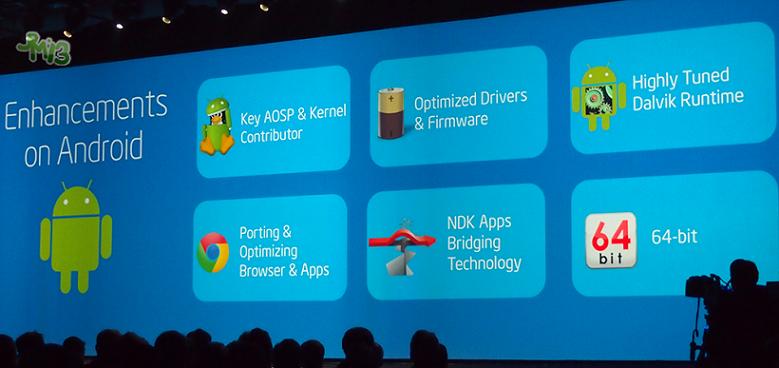
the meantime, Qualcomm unveiled its Snapdragon 410, 610, 615, 808, and 810 platforms, all with 64-bit architecture; a Tegra K1 variant with 64-bit from NVIDIA surfaced in benchmarks a few months ago; and Samsung and Intel both announced plans to jump to 64-bit mobile processors sometime in the near future.
Now, the future has finally arrived! HTC announced the Desire 510, the first of the 64-bit Androids – well, almost.
The SoC powering the Desire 510 is the mid-range Snapdragon 410, which uses ARM’s Cortex A53 CPU architecture. It’s not a high-end super-phone like many in the industry would have imagined. Instead, it’s powered by a low-end, quad-core chip running at 1.2 GHz – hardly anything to write home about. What’s particularly interesting is that, although the hardware supports 64-bit, the software (including the OS), is still very much 32-bit. Why? Android L isn’t available yet.

Should you care?

This is one of those “chicken and the egg” paradoxes. In this case, the hardware is ready, but the OS needs to catch up. That’s okay. I suspect HTC will release an OTA update which will bring Android L to the Desire 510, and presumably 64-bit support as well. Once that happens, with the 64-bit version of the Android Runtime (ART), all your apps should magically be run as 64-bit apps, giving you all the advantages of a 64-bit eco-system without having to wait for developers to update and push new versions of their apps.
All this boils down to the question: although 64-bit Androids are here, should you care?
The answer, whether you’re a fan of 64-bit architecture or not, is a definitive yes. While you may not see huge improvements in performance, 64-bit sure does “smooth out the ride”, allowing extra space (RAM, processing power, etc.) for resource-hungry apps. As mobile apps become more demanding, 64-bit SoCs will become even more important. Future-proofing the hardware is a legitimate argument in favor of 64-bit support, and I’m glad to see that HTC has taken the bold step to do so with one of their budget devices.

 
The Note 4 and Note Edge may be the big new handsets emerging from Samsung’s Unpacked event at IFA 2014, but they’re not alone. We’ve also been picking up on leaks pointing to a virtual reality accessory going back months now, and on the stage in Berlin this afternoon, Samsung has gone ahead and formally announced its Gear VR headset.
Gear VR connects with the Galaxy Note 4, which stands-in as the headset’s display. It docks in place up front, offering its high-resolution quad HD screen to form the images for the VR’s lenses.
Samsung brought Oculus VR’s John Carmack on stage to explain some of the tech, revealing the efforts that have gone into making sure that the Gear VR experience is smooth and engrossing. Those include taking full advantage of the Note 4′s low-latency AMOLED screen, developing custom kernel drivers that act as a bridge between the hardware and apps, and giving VR-related tasks priority over background Android tasks.
In the end, that means latency’s down to a mere 20 ms, with should hopefully be enough to eliminate annoying lag and (with the help of the AMOLED display) distracting motion blur.
If you wear glasses, worry not, as the Gear VR’s adjustable lenses will be able to adjust for your vision.
Sales will begin later this year – no word yet on pricing.

gear-vr-render-frontgear-vr-opened
Source: Samsung

We knew that ASUS was preparing an Android Wear-powered smartwatch, called the ZenWatch, as the company itself was hard at work teasing the gadget. IFA 2014 might officially start only on the 5th of September, but ASUS has kicked off the show with a special event where the company made the ZenWatch official.
The front is taken up by a 1.63-inch AMOLED screen with 320 x 320 resolution, pretty much like on the Samsung Gear Live, among the first wearables to ship with Android Wear. The similarities with Samsung’s offering don’t stop at the screen and resolution, but also extend to the processor: the ZenWatch is powered by the Qualcomm Snapdragon 400 SoC, clocked at 1.2GHz. Also inside the case you’ll find 512MB of RAM, 4GB of internal storage, and a 1.4Wh battery. Bluetooth 4.0 is also present, and the entire build is rated IP55 for splash protection.
In terms of design, as seen in the image above, and video embedded below, the ZenWatch is packaged in a curved stainless-steel case, on top of which a piece of curved Gorilla Glass 3 is offering screen protection. The strap itself is made out of leather, with a simple release latch.
The ASUS ZenWatch also comes with a set of preloaded apps and functions, like “Watch Unlock” – allows you to unlock your phone by touching the watch’s face — “Tap Tap” — double tap the watch to execute a predefined function — as well as others (some of which are pretty self explanatory), like “Cover to Mute,” “Find My Phone,” “Remote Camera” and “Presentation Control”.
A heart rate sensor is also present and ASUS’ own wellness manager on the ZenWatch can gather your health data, including heart rate, as well as step counts (from the pedometer).
September/October is when the ZenWatch should be available (late Q3, early Q4), and it will go for at €199, which is roughly $260.


Source: ASUS (YouTube)
Via: Engadget
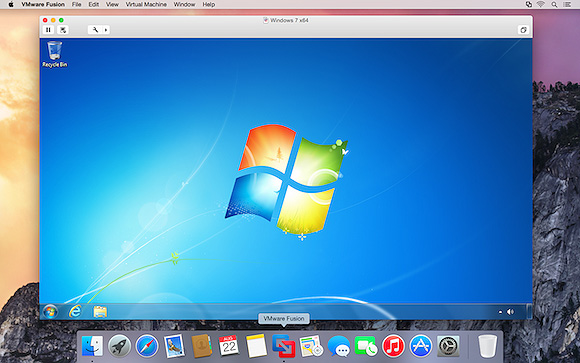
Following the launch of Parallels Desktop 10 last month, VMware has launched its new VMWare Fusion 7 virtualization software, bringing support OS X Yosemite and improving compatibility with Windows 8.1. The release also adds a number of new features, including a new look, improved performance, enhanced connectivity, and optimization for Macs with Retina displays.

vmware_fusion_7_screen
- Designed for OS X Yosemite
Get a more Mac-like experience when running Windows applications on a Mac. The Fusion 7 updated Yosemite look and feel makes working with your Windows applications feel cleaner and more refined.

- Conquer Yosemite
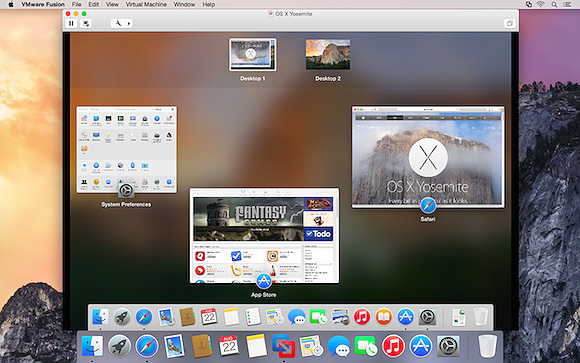
Discover OS X Yosemite by running it in a virtual machine with Fusion 7. Get more from your Mac by running OS X Yosemite and OS X Yosemite Server in virtual machines. Leveraging decades of innovation in leading the virtualization revolution, Fusion 7 is the most reliable way to develop and test new applications for the Mac and iOS.

- Ready for Windows 8.1
Get the most out of Windows 8.1 new features directly on your Mac and run Windows Store apps side-by-side with your Mac applications. With Fusion 7, view Windows Store applications in Launchpad and the Applications folder or put Windows Store Apps in the dock in Unity mode.

- Near-Native Performance
With a highly optimized 64-bit engine and multicore processing power that makes the most effective use of the latest Intel Haswell processors, Fusion 7 runs Windows and Mac applications side-by-side faster than ever.

- Retina Display Optimization
Windows never looked so good with Retina Display optimization for a crisp and detailed experience of your Windows applications. If your Mac has a native Retina display or is connected to one, Fusion 7 ensures you get a seamless experience when running Windows across Retina and non-Retina displays.
The more advanced VMware Fusion 7 Pro has also been launched, bringing the same features along with dual GPU optimization, virtual network management, enhanced support for cloned virtual machines, and more.

vmware_fusion_7_screen2
VMware Fusion 7 is available now for $69.99 while VMware Fusion 7 Pro is priced at $149.99. Those upgrading from VMWare Fusion 5 or 6 are also eligible for discounted pricing of $49.99 for VMWare Fusion 7 or $79.99 for VMWare Fusion 7 Pro. 
 

How to Block or Mute Someone on Twitter

Posted by Unknown | 11:38 AM Categories: ,
twitter_logo_on_laptop_reuters.jpg

As good as Twitter is to share your opinion and to follow news stories, it can be an unforgiving place sometimes. We've all encountered Internet trolls, but some of them get abusive and it can be very hard to deal with this on a daily basis. And then there are the contests that can completely take over your timeline. Luckily, Twitter has a couple of tools that let you get hide tweets from certain accounts. Whether someone is trolling too or spamming on Twitter, these tools will help you deal with the situation. Here's how.
Mute
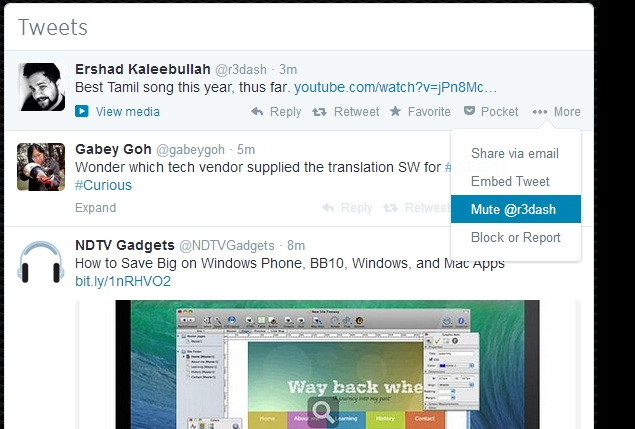
Twitter recently introduced the mute feature to its apps and the Web interface. This works if you want to hide tweets from someone without unfollowing them. We've found this feature useful when some people we follow had been posting several tweets for contests. We muted them for a day and this hid all the annoying contest tweets from our feed.
Muting is not the same as blocking. Muted users can follow you and send you direct messages. They can reply to your tweets and mention you in tweets. These will still show up in the notifications tab on Twitter. Another thing to remember is that tweets posted before you muted a person will show up on your timeline. The tweets posted after you muted him or her will not.
Here is how you can use this feature.
1. On the Web, click More below any tweet by the person you want to mute. Now click Mute. Alternatively, you can go to their profile page and click the gear icon > Mute. After you mute a person, the option to unmute will appear in the same place. Just open the profile, click the gear icon > Unmute.
2. On Twitter's Android and iOS apps, open any person's profile, tap the gear icon > Mute > Yes, I'm sure. The mute feature isn't yet available on Twitter's apps for other platforms yet.
3. To check if you've muted someone, just go to their profile page. If you see a red mute icon next to the gear icon, then you've muted them. A quick way to unmute is to simply tap or click this icon.

Twitter_mute.jpg
Certain third party services also allow you to mute keywords or hashtags. This is very useful if your timeline is being spammed by a Twitter contest, for example. Our favourite service is a paid app called Tweetbot (Rs. 300 on iPhone, Rs. 190 on iPad). Here's how to use it:
1. Sign in to Tweetbot for iPad > tap Mute filters on the left side of the page > tap Edit on the top right. Tap the '+' button > tap Mute Keyword. Then type in the "football", or whatever you'd like to mute.
2. On Tweetbot 3 for iPhone, sign in and long-press the profile picture next to any tweet. Tap Mute to mute tweets from that profile. The mute filters icon is located on the bar at the bottom.
3. To mute hashtags (for contests etc.) you simply long press a hashtag on your timeline and then tap the duration you want it blocked for. You can also mute users like this by long pressing their profile pictures.
Block
This is an extreme option that's useful if you encounter spammers or if people are harassing you on Twitter. Blocked users cannot follow you or add your account to their lists on Twitter. You will not see tweets from these people, even if they mention your Twitter handle. People you block will also not be able to see your profile picture.
If you're sure you don't want to interact with a person on Twitter, try this.
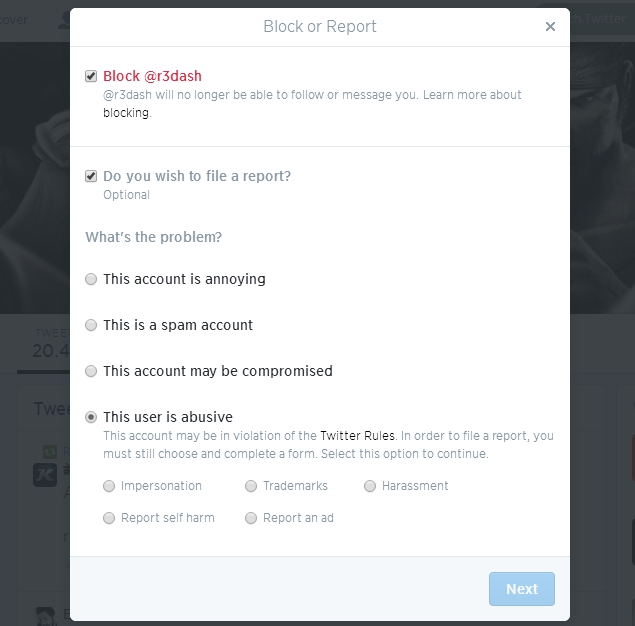
1. Go to the person's Twitter profile, tap the gear icon > Block or Report. The Block option will be checked by default and you can select File a report if you want to tell Twitter about the problem. The Twitter mobile website doesn't allow you to mute people, but you can report tweets and block people on it.
2. You can select reasons such as "This is a spam account" or "This user is abusive". If you choose any of the options except "This user is abusive", you can click Report to let Twitter know about the problem. If you choose "This user is abusive", Twitter will ask you to fill a form specifying what kind of abuse you are facing and will ask for some contact details. The page advises you to contact local authorities if you feel like you're in danger.

3. To unblock a user, go to their profile, tap the gear icon > Unblock.
Twitter_block.jpgThat should have helped you mute or block people on Twitter. For more tutorials, visit our How to section.

LINK

Tuesday, September 2, 2014

GearLive

Google is casually tipping its hand and revealing a bit of what's in the cards for smart watches running on its Android Wear platform, detailing updates that will enhance support for voice control and navigation in the short term with the promise of a steady streams of patches for the long run.
Early entries into the smart watch sector from LG and Samsung have helped forward thte development of Android Wear and several other hardware manufactures are expected details plans for devices that will operate on the platform. On the other side of the fence and on the same field, Apple's iWatch is projected to make an appearance alongside the upcoming iPhone 6.
With smart watches continuing to gather steam and competition from a rival arriving soon, Google is pushing the evolution of Android Wear with a series of regular, yet significant, stream of updates. In a conversation with CNET, Director of Engineering for Android Wear David Singleton and Vice President of Engineering for Android Hiroshi Lockheimer detailed some of the changes inbound for Android Wear and shared their vision for devices running the operating system (OS).
In an update to Android Wear, said to be days away, Google will rol lout enhancements that enable the the OS to leverage the native GPS tech inside of smart watches and the software upgrade will enhance the performance of voice control. The company would like to improve interaction between smart watches and devices beyond smartphones.
While Singleton says official support for custom watch faces hasn't been forgotten, he spent more time looking up at the big picture. The ability to roam the yard without a tether to a smartphone will enable smart watch wearers to go for a run with strapping a phone to an armband or weighing down a pocket with a handset, according to one scenario presented by Singleton.
"One of the things we're going to be able to do is add the ability for these devices to start working with some of the other devices you might wear on your body," says Singleton. "So we'll have an update coming that allows you to pair a Bluetooth headset with your watch. And that means you can play music stored on your watch directly on your Bluetooth headset."
smart watches are guided by the same principles as other wearable tech Google is prototyping or pushing, according to Lockheimer. It all about improving lives, he says.
"Our approach to wearables is the same as our approach to any of our products: We want to build technology that delights people by improving their lives," says Lockheimer. "So our approach to wearables -- watches, Glass, even our smart contact lens project which is designed to help people with diabetes measure their glucose -- is to build things that you use when you need and forget about when you don't."