Translate

Showing posts with label iPad. Show all posts

Tuesday, September 2, 2014


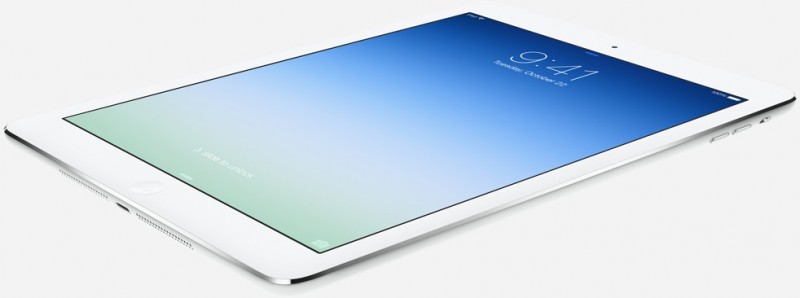
ipad_air_flat
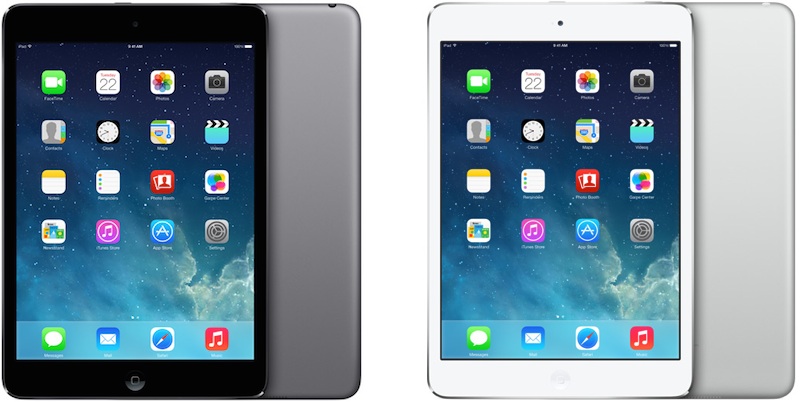
Retina iPad mini

Best Buy is offering $50 off most models of the Retina iPad mini, dropping the price on the Space Gray entry-level 16GB Wi-Fi only version to $349. The discount applies to both Wi-Fi and Cellular models across the board, with almost all versions getting the price cut. Entry-level Cellular models, such as the 16GB Silver version from AT&T, are priced at $480 with the discount.

In addition to iPad Air discounts, Staples is offering $30 off all models of the Retina iPad mini for Labor Day weekend, dropping the price of the entry-level 16GB Wi-Fi only model to $399, for example. The company is also offering $100 off select computers that are regularly priced at $499 or more with the coupon code 11605, which applies to all iPads priced over $499, for a total discount of up to $130 on some Retina iPad mini models.

retina_ipad_mini_colors_front_back
Apps

The Labor Day holiday is often a popular time for app discounts, and this year is no exception. Many app developers are already offering their apps at reduced prices, and additional discounts are expected before Monday. Our sister site TouchArcade has made a list of games already discounted, which includes Another World, Impossible Road, Pathogen, LEGO The Lord of the Rings, Strata Super Lemonade Factory, VVVVVV and more. Other apps on sale include Instacast 4 GoodReader 4, and Clone Magic.

Apple Accessories

Best Buy is offering a $100 iTunes gift card for $85, a discount of $15. Groupon is also offering a $15 iTunes card for $10, a discount of $5.

itunescard
Woot is selling Sennheiser's MM---50-IP In-Ear Headphones with Apple Control for $24.99, a $25 discount. Woot is also offering a refurbished Jawbone Big Jambox Bluetooth speaker for $159, down from $299 new.

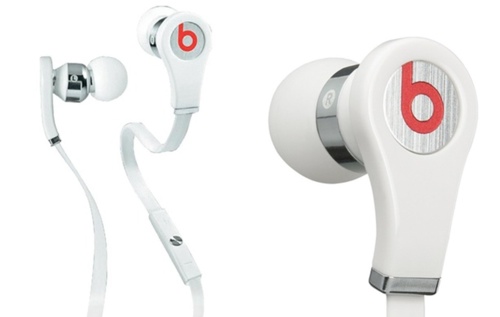
beatsinearheadphones
Groupon has the Logitech Folio case for the iPad Air for $19.99, a discount of $30. Groupon is also offering the Beats By Dre Tour In-Ear Headphones for $109.00, a discount of $40 off the regular price.


There are quite a few deals on Apple products, apps, and accessories this week due to the upcoming Labor Day holiday in the United States. Retailers have discounted the iPad Air, Retina iPad mini, and more, and several app developers are cutting app prices.

While there are few deals on Apple's lineup of Mac products, Apple's own back to school program is still ongoing until September 9, offering EDU customers a gift card with the purchase of a Mac, iPad, or iPhone. Best Buy is also continuing to offer EDU customers $100 off all MacBooks and the iMac.

iPad Air

Staples is offering $30 off all models of the iPad Air for Labor Day weekend, dropping the price of the entry-level 16GB Wi-Fi only model to $469, for example. The company is also offering $100 off select computers that are regularly priced at $499 or more with the coupon code 11605, which applies to all iPads priced over $499, for a total discount of up to $130 on some iPad Air models. 

Monday, September 1, 2014

Speaker docks for Apple's iPad aren't quite as prevalent as those for the iPhone and iPod, in no small
part due the size of unit needed to hold the larger tablet device.
Increasingly, though, the big names are starting to offer solutions. Altec Lansing, Philips, JBL and others have got in on the act, and so has Logitech. In fact, Logitech has really jumped aboard the iPad bandwagon, offering accessories such as the excellent Tablet Keyboard for iPad.

This speaker dock doesn't really bother with fancy features – it's not battery powered, and there's no AirPlay or other wireless audio – but just focuses on holding your iPad sturdily, charging it and playing music.

Logitech speaker stand for ipad
The base is quite large, but we've no complaints about that. It means the whole unit is stable, and offers lots of space for speaker drivers. On the front is of the base are the controls: the on/off button and volume buttons.

Logitech speaker stand for ipad
The arm that holds the iPad is quite stiff to move, but again we don't see this is a downside, since it means your iPad won't be falling flat any time you press it. There's very little wobble from the unit when you're tapping the iPad, which you get in some stands.
There are small plastic sleeves to accommodate the slimmer profile of the iPad 2, but iPad 1 owners can just remove than to fit the older device in.
The arm rotates 90 degrees so you can use the iPad in landscape mode, and it clicks into place once fully rotated. This is the only part of the unit that has a little give – the there's some shifting once it's in the landscape position, but not a huge amount.

Logitech speaker stand for ipad
The last question is the sound quality. Put simply, it's sufficient. This isn't really a party machine; it's more of a desk companion. There's noticeable bass and decent clarity at the high end, and the middle is really quite good, with lots of detail. It can go quite loud, but the louder you go, the less definition there is in the bass and treble, and it becomes generally more shrill, so it's designed more for background music.
That said, it handles speech very well even up to quite loud volumes, so it's ideal for watching iPlayer or 4oD.
Overall, the Altec Lansing Octiv 450 is probably a slightly better unit, with marginally improved sounds compared to the Logitech Speaker Stand, but it costs around twice as much. For an RRP of £50, and available online at around £40, this is an excellent choice for an iPad stand when it comes to value for money.

Sunday, August 31, 2014


If you’re looking for a midsize tablet, you probably know that the iPad mini with Retina display reigns supreme. But Samsung wants to replace Apple’s tablet in your heart with its new Galaxy Tab S 8.4.
And with an incredibly colorful display, luxe design, and a boatload of special features, the Tab S 8.4 has a lot going for it. And, by total coincidence — yeah, right — the Tab S sells for $399, just like the iPad mini.
That said, there’s a reason Apple’s more diminutive slate is one of the most popular tablets you can buy. From its sleek, industrial design to the massive number of iPad-specific apps available, the iPad mini is an impressive piece of technology.
So which of these two tablets should you call your own? Let’s find out.

Round 1: Design and size
Tablet Faceoff: iPad Mini with Retina Display vs. Galaxy Tab S 8.4

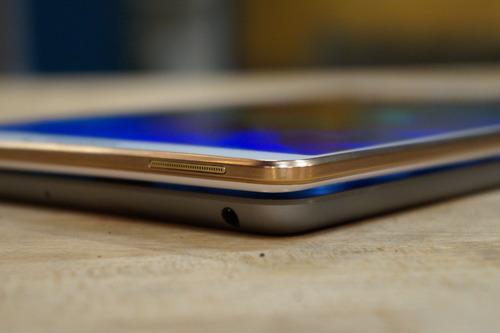
After years of building mediocre tablets, Samsung has finally created a genuinely attractive one. It’s exceedingly thin and light but still has a solid, premium feel. My Tab S came with a “Dazzling White” paint job and featured a bronze trim around its edges, which gave it a surprisingly luxurious look.

However, the Tab S, like all of Samsung’s devices, is made of plastic, which detracts from its otherwise haute styling. Still, it does keep the tablet relatively lightweight.
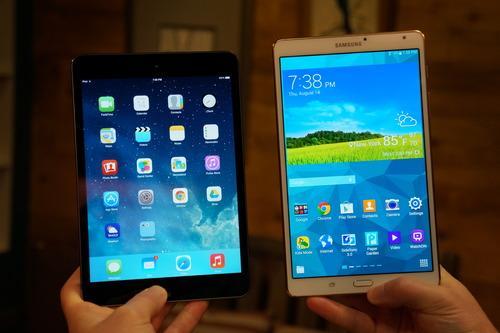
In fact, at 10.4 ounces, the Galaxy Tab S is lighter than the 11.6-ounce iPad mini, despite the fact that the Samsung has a larger display, 8.4 inches compared with the iPad’s 7.9 inches.

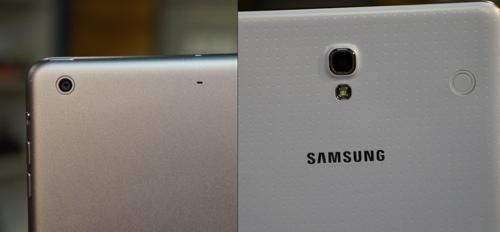
Edge of Samsung Galaxy Tab S 8.4 and iPad mini

The iPad mini with Retina display may have the same look and feel as the original iPad mini, but it’s as beautiful as ever. The slate’s metal-and-glass industrial design is sleek and sexy, and it has the same polished chamfered edges and less-is-more styling that make the iPhone so gorgeous.
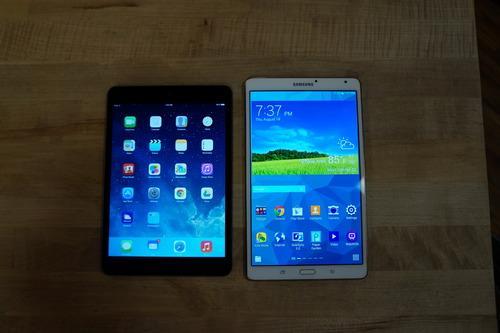
The iPad mini uses the same 4:3 screen aspect ratio as all of Apple’s tablets, which means its display is more square than the Galaxy Tab S’s, which sports a 16:10 aspect ratio. The 8.4 × 4.9 × 0.26-inch Tab S is taller, though more slender, than the 7.9 × 5.3 × 0.29-inch iPad mini.
WINNER: iPad Mini with Retina display 

Round 2: Display quality
iPad mini and Samsung Galaxy Tab S 8.4 displays

The Samsung Galaxy Tab S’s most noteworthy feature is its display. Not only is the tablet’s 8.9-inch screen larger than the iPad mini with Retina’s 7.9-inch display, but it also offers a higher pixel resolution of 2560 × 1600, versus the iPad’s 2048 × 1536. Photos, videos, and websites will look a bit sharper on the Tab S than on the iPad.
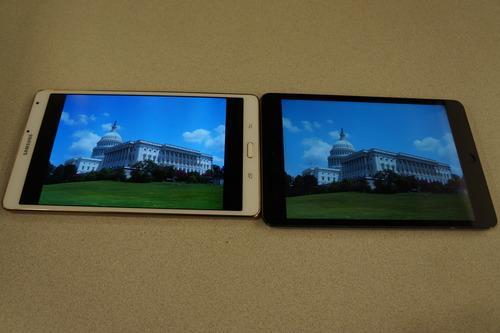
In addition to its clarity, the Tab S’s display shows the brightest, most vibrant colors I’ve ever seen on a tablet. Put the Tab S next to the iPad mini, and the difference will blow you away. Everything just looks more inviting on the Tab S.

Samsung Galaxy Tab S 8.4 and iPad mini screens

But there’s a catch. Though colors look more vivid on the Tab S, they’re also incredibly exaggerated. While looking at a 1080p photo of a grassy field, greens on the Tab S looked almost neon. When viewed on the iPad, the same field looked more natural.
In fact, most colors viewed on the iPad mini came closer to their real-life counterparts than those viewed on the Tab S.
I preferred the Galaxy Tab S’s display to the iPad mini’s, as it was larger and significantly brighter. And though some colors were exaggerated, the majority of the time, they looked fantastic.
WINNER: Samsung Galaxy Tab S 8.4
Round 3: Software and apps
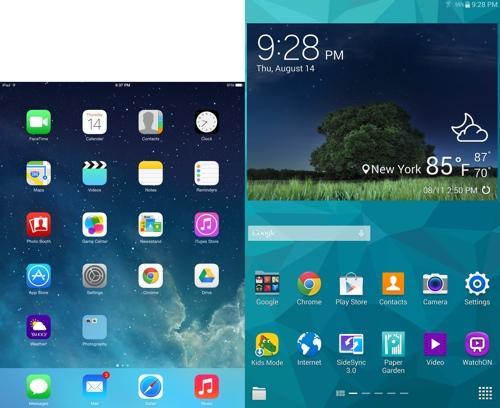
Samsung Galaxy Tab and iPad mini home screens

The Galaxy Tab S 8.4 runs Android KitKat, the latest version of Google’s mobile operating system (OS), with Samsung’s TouchWiz design interface. TouchWiz is an Android “skin” that adds additional features and design flourishes to Google’s OS.
The Tab S features two main home screens, with the option to add up to three more. Each of the screens can be customized with apps, app folders, and widgets — small versions of apps that you can interact with.

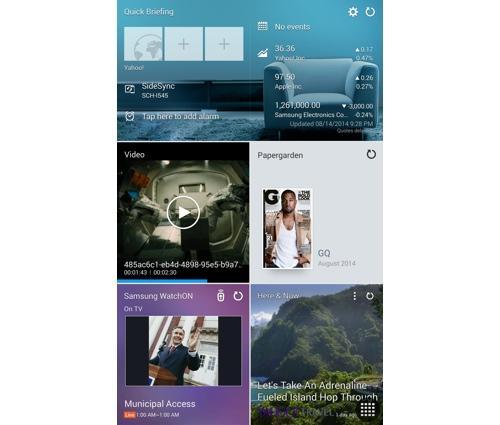
Samsung Galaxy Tab widgets

Unfortunately, the Tab S’s interface feels cluttered and overwhelming out of the box. The myriad apps and widgets presented on screen will likely confuse many first-time users. What’s more, there are precious few Android apps that are optimized to work with the Tab S’s display. Even major apps like Facebook and Twitter look stretched and distorted.

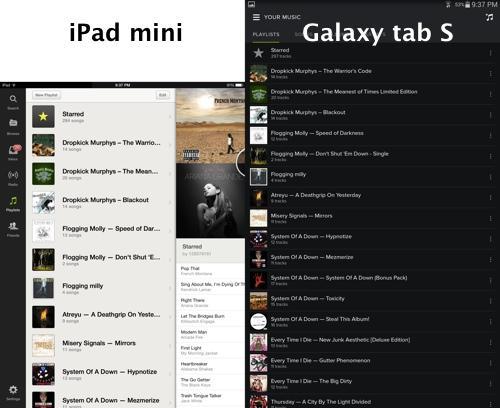
Music apps on Samsung Galaxy Tab and iPad mini

The iPad mini with Retina display runs on Apple’s iOS 7, which feels far more streamlined than TouchWiz. Better still, the there are lots of iOS apps that have been optimized for the iPad mini’s Retina display, ensuring that they not only look clean, but fit the screen properly as well.
WINNER: iPad mini with Retina display
Round 4: PerformanceBoth the Samsung Galaxy Tab S 8.5 and the iPad mini with Retina display pack impressive performance. The slates feature top-of-the-line processors that ensure that apps open quickly and that playing games like Leo’s Fortune is buttery smooth.
The base configurations of the Tab S and iPad mini offer 16 GB of storage, which isn’t a whole lot of space when you consider that you’ll likely be saving photos, music, and movies on these tablets.

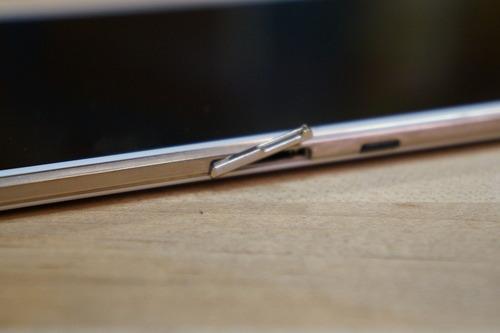
Galaxy Tab S's microSD slot

Fortunately, the Tab S includes a microSD card slot that can support cards with up to 128 GB of memory, so you can bring every single episode of Game of Thrones with you wherever you go.
Apple tablets don’t have card slots.
Battery life for the Galaxy Tab S and iPad mini wasn’t much of an issue, as both tablets easily lasted all day without needing a charge. Samsung and Apple claim their respective tablets will give you as much as 10 hours of Internet surfing, though those seem to be ambitious estimates.
WINNER: Tie

Round 4: Cameras
iPad mini and Samsung Galaxy Tab S cameras

The Samsung Tab S 8.4 features an 8-megapixel (MP) rear camera, while the iPad mini gets a 5 MP shooter. As we’ve pointed out before, though, a higher megapixel count doesn’t necessarily make a camera better than one with a lesser number of megapixels.

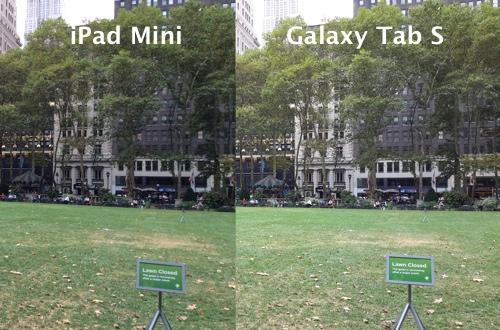
Photos shot with iPad mini and Samsung Galaxy Tab S

Shots taken of New York’s Bryant Park with both the Tab S and the iPad mini offered amazing detail, but colors in the iPad’s photos were more representative of what I saw in real life. The Tab S’s camera, meanwhile, produced colors that were a tad duller than they actually looked.

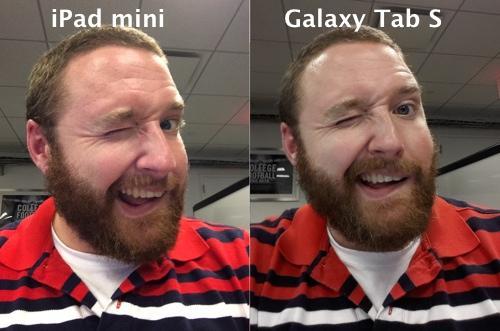
Selfies shot with iPad mini and Samsung Galaxy Tab S

If you want your tablet to be able to take quality selfies, you’ll be happy to know that both the Tab S and iPad mini are up to the challenge. Of the two, though, we preferred the iPad mini’s front camera, as it, once again, captured more realistic colors.
WINNER: iPad mini with Retina display
Round 5: Special featuresSamsung’s M.O. is to load its devices with as many features as it can, and that’s no different on the Galaxy Tab S 8.4. This tablet comes loaded with a fingerprint sensor for unlocking the slate and making PayPal payments, similar to the one found on the Galaxy S5; as well as Samsung’s Multi Window mode and SideSync 3.0.

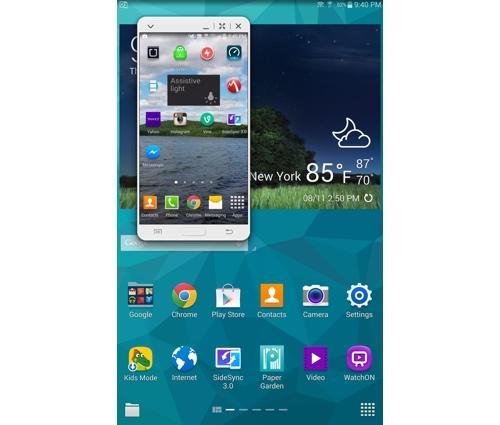
Multi Window mode on the Samsung Galaxy Tab S

Multi Window mode lets you open two apps on screen at the same time, including two instances of the native Samsung browser or Chrome. It’s a great feature, and one that multitaskers will appreciate.
The Tab S’s SideSync 3.0 function allows you to connect your smartphone with the tablet via Wi-Fi Direct, creating a mirror image of your phone on the tablet’s display. From here you can interact with your handset as if you were holding it. For example, you can browse the Web and make phone calls without having to grab your phone.

Samsung Galaxy Tab S SideSync function

True, it’s the ultimate tool for people too lazy to get their phone from the other room, but it’s also pretty cool. Unfortunately, SideSync works only with certain Samsung devices.
The iPad mini doesn’t offer much in terms of special features. The slate’s coolest feature is its Siri digital assistant, which can do everything from post to Facebook or Twitter to book a table via the OpenTable app.

iPad mini's Siri feature

But the Tab S, which runs on Google’s Android, gets the search giant’s Google Now, app, which puts Siri to shame.
WINNER: Samsung Galaxy Tab S 8.4
Bonus Round: AccessoriesIf you’re buying a tablet, chances are you’re also going to buy a case for it. The Galaxy Tab S 8.4’s rear panel sports two tabs that connect to one of Samsung’s Book Covers. The case, which doubles as a stand, completely wraps around the tablet, protecting both its back cover and display. Samsung also touts Belkin’s wired keyboard as an optional accessory.
The iPad mini is one of the most ubiquitous tablets on the planet, which means there are a nearly endless number of accessories for the slate. That includes everything from Apple’s own Smart Cases to any one of the available third-party Bluetooth keyboards on the market.
True, the Tab S 8.4 is compatible with nearly any Bluetooth-capable accessory, but there are more accessories designed specifically for the iPad.
WINNER: iPad mini with Retina display
Conclusions

iPad mini with Retina display

It’s a close contest, but the iPad mini beats the Galaxy Tab S 8.4 as the best mini tablet. Not only does the iPad sport a superior design and a more fluid interface, but it also supports a larger apps library and a wider array of accessories. The Tab S, on the other hand, offers a gorgeous, though exaggerated display, and is dripping with special features including the capability to truly multitask.
If you’re dead set on buying a midsized Android tablet, the Tab S is easily the best on the market. But if you’re looking for the all-around best slate, the iPad mini with Retina display is the way to go.
What’s more, Apple is rumored to be making some big announcements surrounding the iPad mini and Air in the coming months. The best midsized tablet on the block may get even better.

Saturday, August 30, 2014

The Datacolor Spyder4 Elite is a colour calibration device that can be used to calibrate monitors,
projectors, laptops, TVs, iPads and even smartphones using an easy-to-follow step-by-step based process.
Like the X-Rite ColorMunki Display, it works by by measuring a series of colours on a screen and creating a "profile" that can be saved and replicated on other devices. However, the two tools are different beasts in that the Spyder offers a much wider range of calibration tests beyond basic colour correction, making it a more serious option for photographers, video editors, web designers and other professionals who need to calibrate beyond colour accuracy.
The Spyder4 Elite is the most advanced (and expensive) of the three calibration calibration tools in Datacolour's Spyder range, with an RRP of £165, placing it above the mid-range Spyder4 Pro (£115) and low-end Spyder4 Express (£66).

Tangled web

An uncalibrated display can present a number of problems for multimedia professionals. Overly dark monitors, for example, can present shadows on images that aren't really there, and problems with colour accuracy can result in areas of a panel displaying overly warm (yellow) or cool (blue) areas. If you're a photographer, you'll want to make sure the sky is really blue in that set of lucrative client photographs, rather than an ominous shade of toxic green.
Setting up the device is simple. We were supplied with two driver CDs but opted to go straight to Datacolour's website where they can be downloaded. It's worth double checking that you've selected the correct drivers (rather than those for the Pro or Express versions), as you won't be notificed of your error until halfway through the installation process.
The Spyder4 Elite wizard
The calibration wizard: almost magic
After firing up the software you're presented with the calibration wizard, which begins by checking that you've carried out a number of steps to help achieve optimal results. They include warming up the monitor for half an hour, checking lighting conditions and resetting displays to factory default settings.
It then asks what type of display you're calibrating, along with specific information that can aid the process - such as its make, model, contrast and brightness levels and kelvin presets (warmth levels). These aren't mandatory, and if you're not sure of them you're better off not chancing your hand as getting it wrong can negatively impact the end result.
As a final step, the wizard requires the calibrator to be inserted into its plastic holder in order to measure ambient light, as too much light shining on the display can skew results.
The calibration process begins once the device has been positioned over a marked area on the display, done by adjusting the device's weighted cord to fix it into position. The software then takes a series of measurements against a series of changing colours on the screen. The process takes around five minutes during which you may be asked to tweak brightness settings manually using the monitor's menu controls.
Spyder4 Elite calibrator
Just hanging out, calibrating some pixels

Advanced calibration

Once complete, a profile is created and saved in a default location on the machine. The results can be viewed and you have the opportunity to "SpyderProof" the results by tweaking them using a series of sliders and checking them against a set of stock images until satisifed. The results may be dramatic or subtle depending on the display's colour accuracy out of the box, and profiles can then be applied to different dispays to ensure a consistent look across devices.
Post-calibration you're given the opportunity to then carry out a series of advanced tests to check display aspects such as the gamut (colour saturation), tone response, brightness, contrast, black levels and screen uniformity. They can take anything from five to 15 minutes depending on the level of manual interaction involved. Checking screen uniformity, for example, is one of the lengtheir tests as it requires the calibrator to be moved to nine different sections of the screen by hand.
There's a deep level of depth when it comes to conducting the advanced tests, which are once again accompanied by clear and easy-to-follow instructions. However, aside from a standard help menu that provides an overview of each test, there's a distinct lack of help when it comes to analysis, leaving you to figure out what the results mean on your own. If you're familiar with deciphering aspects such as black levels, gamut and tone you won't run into any problems, but those looking to learn more about colour calibration and learn a thing or two along the way will be left feeling lost.

Verdict

Datacolour's Spyder4 Elite is one of the most thorough colour calibration tools out there, but it's also one that tends to assume you're comfortable with deciphering its results at the more advanced end of the scale. That said, its picture-led, wizard-driven calibration process is accessible for novices and experts alike, and if you want to "future proof" any purchase of a calibration tool, there's nothing stopping you undertaking the simpler tests and moving onto the more advanced ones when you're ready.
On the other hand, if you only want to check and alter a display's colour accuracy, the company's lower-end Spyder4 Express and Spyder4 Pro (or X-Rite's ColourMunki Display) devices will do the job for a much lower price.
If you need the absolute maximum level of calibration available and are prepared to put in time to undergo the manual processes required for the advanced tests, the Spyder4 Pro provides an almost exhaustive level of analysis.

Thursday, August 28, 2014

gionee_gpad_g5_official_press.jpg
Gionee on Thursday has launched the successor to the Gpad G4 phablet, the Gpad G5, priced at Rs. 14,999. The Chinese smartphone manufacturer says the smartphone will be available by next week via both online and offline retail channels.
The Gionee Gpad G5 supports dual-SIM functionality and runs Android 4.4 KitKat out-of-the-box. It features a 5.5-inch HD (720x1280 pixels) IPS display with AGC Dragontrail glass protection.
The phablet is powered by a 1.5GHz hexa-core Cortex-A7 processor and ARM Mali-450 MP GPU coupled with 1GB of RAM. The Gionee Gpad G5 comes with an 8-megapixel rear camera with LED flash, and a 2-megapixel front facing camera. It has 8GB of inbuilt storage with that can be expanded up to 32GB.
The Gpad G5 offers 3G, GPRS/ EDGE, Wi-Fi, Bluetooth 4.0, GPS/ A-GPS, and FM radio connectivity. It also sports dual crystal loud speaker with DTS, and will be available in Black and White colours.
The Gionee Gpad G5 measures at 157.3x77.6x7.9mm, and weighs 104.6 grams. It packs a 2400mAh battery, which is rated to deliver up to 288 hours of standby time, up to 15 hours of talk time on 2G, and up to 12 hours talk time on 3G.
gionee_gpad_g5_press.jpg"I am delighted to present our consumers with our latest product, the Gionee Gpad G5. Our basic thought behind introducing this product was to give our consumers a superior product that can be handled with ease. There is a huge demand for premium features at affordable prices. Keeping consumer preferences in mind we have introduced the device which is high on features and easy on the pocket," said Arvind Vohra, India Head, Gionee Smartphones.
Gionee had launched the Gpad G4 in February this year. It had included a 5.7-inch HD IPS display with 720x1280 pixels resolution; a Cortex-A7 1.5GHz quad-core processor and PowerVR Series5XT GPU; 1GB of RAM; 13-megapixel auto-focus camera with LED flash; 5-megapixel front facing camera; 16GB of inbuilt storage with the no support for expansion via microSD card; 163.5x81.3x7.95mm dimensions; 3200mAh battery, and Android 4.2 Jelly Bean.


Source...

Wednesday, August 27, 2014

iPad Air 2 release date, news and rumors

Posted by Unknown | 5:47 PM Categories: ,
The iPad Air 2, the obvious follow up to the iPad Air, is set to be an iterative update to the currentbest tablet on the market right now.

While its name is likely to be in the iPad Air 2 region, this will actually be Apple's sixth generation full size (9.7-inch) tablet - and the Cupertino based firm will be looking to continue its domination at the top end of the market.
Many rival manufacturers have attempted to ape the iPad's success, but numerous Android and Windows devices have tried and failed to match the premium build quality, consumer lust and ultimately the sales figures that Apple has enjoyed.
Apple is going to have a tough job topping the iPad Air, after it gained a coveted 5 star TechRadar review and it currently sits proudly at number 1 in our "Best Tablets in the World" top 10.

There's very little on the new iPad to tell you about right now, but that doesn't mean we can't take an educated guess at when the new model is coming and with the help of the rumours which are starting to circulate we can also explore what it may offer.
The launch of iOS 7.1 contained some mentions of two newer models of iPads, according to 9to5Mac, noting iPad 4.3 and 4.6 models, which could reference the new iPad Air and iPad Mini 3.

Cut to the chase

  • What is it? The sequel to the iPad Air
  • When is it out? The current best guess is a November 2014 launch
  • What will it cost? The iPad Air 2 will likely start at £479 / $500 / AU$600

iPad Air 2 release date

The iPad Air 2 release date is likely to be the beginning of November, with the launch happening at the start of the month or the week after.
Why November? Well that's when the iPad Air made an appearance last year, and Apple does like to stick to its annual produce cycle - if you overlook the whole iPad 4 thing. It should be on track for November too, as according to Bloomberg's sources the iPad Air 2 has already gone into production.

iPad Air 2 rumors

The iPad Air 2 is not going to drop in cost if Apple's past performance is anything to go by, and we can't see the design changing that much either given the recent change in the larger iPad's chassis last year.
There are some analyst rumors buzzing around and KGI analyst Ming-Chi Kuo believes that the new iPad Air will come with an Apple A8 processor, as well as sporting an 8MP rear camera and inheriting Touch ID from the iPhone 5S.
This theory which is given extra credence by the mention of iPad's in the Biometric Kit for iOS 7.1. Kuo added that he expects the new slate to ship towards the end of the third quarter.
Obviously an analyst is just that, so these theories are unlikely to be based on hard evidence, but Kuo has a better track record than some, as among other things he correctly predicted the inclusion of a fingerprint scanner in the iPhone 5S.

iPad Air 2 design

Kuo's theories are looking increasingly believable, as according to sources speaking to ETNews the iPad Air 2 will have an A8 chip, which is expected to improve efficiency and increase battery life, and its main camera will be boosted from 5 to 8MP, while the front-facing snapper will be increased to 1.5MP.
However they went on to say that the design is going to be similar to that of the original iPad Air and its screen will stick at a resolution of 2048 x 1536. However according to sources speaking to Bloomberg that screen might have an "anti reflection coating" which would make it easier to read.
iPad Air 2 panel
We've also caught a glimpse of what might be the new iPad Air's front panel and it appears that the display is integrated into the panel, which would allow it to be slimmer than the iPad Air, which has a separate display and panel.
A more comprehensive leak claiming to show off a prototype iPad Air 2 in pretty much all its glory has also hit the web, revealing subtle design changes rather than a total overhaul.
iPad Air 2 - LEAK
(credit: nowhereelse)
Something worth noting in this series of images is the fact the TouchID button from the iPhone 5S appears to be on the iPad Air 2, backing up Kuo's claim that the biometric tech will land on the slate.
iPad Air 2 - LEAK
A new button design may be on the cards (credit: nowhereelse)
iPad Air 2 - LEAK
Will the camera get a boost? (credit: nowhereelse)
iPad Air 2 - LEAK
A slim profile is pretty much nailed on (credit: nowhereelse)
TouchID seems to be the feature of choice surrounding most of the next-gen iPad rumors, as another image claiming to show the iPhone 6, iPad Mini 3 and iPad Air 2 highlights the fingerprint scanner on all three devices.
While another recent leak mentions that Touch ID will be included in the new iPad Air and that it's going to be more durable than the current incarnation.
iPad Air 2 - LEAK
The Air 2, Mini 3 and iPhone 6? (credit: AppleClub)
We've also seen yet another photo of the iPad Air 2, this time alongside an iPhone 5S and with Touch ID just as much of a focus as it has been in previous images.
iPad Air 2
It appears the iPad Air 2 just can't stay away from cameras, as a series of shots appeared on ASCII Plus showing off the front, rear and sizes of a tablet which looks very similar to the ones appearing in previous leaks.
The report does state that the device next to the current iPad Air in the shots is a mock up of Apple's tablet, so it has to be taken with a pince of salt - but again it's more of the same with no slider switch above the slightly redesigned volume keys.
iPad Air 2 - LEAK
No slide switch on the Air 2? (credit: ASCII Plus)
iPad Air 2 - LEAK
iPad Air 2 (L) mock up lines up next to iPad Air (R) (credit: ASCII Plus)
iPad Air 2 - LEAK
The Air 2 is missing its Apple logo (credit: ASCII Plus)
Yet another set of images has emerged, this time supposedly showing the rear cover and they largely line up with what we've seen so far. It's evident from them that the volume controls have been recessed into the frame, while the speaker grille is now a single line of holes and there appears to be a microphone next to the rear camera.
Rear cover
While we loved the iPad Air, there's always room for improvement. Head over to page two to see what we'd love to see on the iPad Air 2.

The iPad Air is a great device but even brilliance can be built upon, so there's room for improvement for Apple's sixth generation slate - aka the iPad Air 2.
Since the Air shares much of its design and many of its components with the latest iPad mini, some of this list overlaps with what we want to see for the iPad mini 3. But given the new iPad Air will be the flagship model, there are a few other things Apple could do.

A bigger screen

There's always a tradeoff between portability and screen size, but the success of some competing tablets shows that there is a market for devices larger than the iPad.
And before you dismiss the idea, remember this is the company that said it wouldn't build a smaller iPad and then went on to design the wildly successful iPad mini.
iPad Air 2
Recent rumours have raised the spectre of a 12.9-inch iPad, significantly larger than the current 9.7-inch screen and running at 2K or even 4K resolution.
While the current Retina display running at 2,048 x 1,536 pixels could arguably already be described as 2K or very close, having a physically larger screen would be good for movies and photo editing, and Apple likes to boast about statistics when it suits.
Of course, this could actually be the much-vaunted iPad Pro, which would mean the iPad Air would stay the same - and if that's the only way to maintain portability, we're all for it.
Current rumors are pointing to a more 'pressure sensitive' display, which would allow for better reception of prods from your digits and even that much-fabled iStylus that could do everything but make the tea for you.

Bluetooth mouse support

As the iPad gets more powerful it becomes a more realistic proposition as a work machine, with current models inching closer to being dubbed true laptop replacements. The only problem is that touch input just isn't as accurate as mouse input for some tasks.
Adding support for mice or graphics pen-style devices over Bluetooth could make the iPad a more usable device for more complex tasks, especially when it comes to graphics apps.
This would be quite a step for Apple since it touts touch as easy and intuitive, but it would nonetheless be welcomed by some users.

Facial recognition

iPads have had a front-facing camera for ages, and the Camera app is already able to detect faces when focusing.
So it would be nice to have some means to unlock or authenticate your device by simply holding it up as you normally do and having the camera recognise you. However, there's a big caveat here: Apple needs to do what it did with Touch ID and make the system work instantly, and be very hard to spoof.
There are other possibilities instread, such as eye tracking, scrolling pages depending on your eye movements, or pausing movies when you look away. Again, we've seen these already, so we'd be looking to Apple to make the system flawless.

Touch ID

Like the Mini, the iPad Air still lacks the Touch ID sensor found in the new iPhone 5S. This seems a little odd for an expensive flagship device, and in future you can expect to see fingerprint sensing used for more than just unlocking a device, so putting it in the iPad would enable easier downloads, logins and even user switching.
iPad Air 2
Its current omission may be a cost issue, in the sense that Apple wants to protect its profit margins, but over time all technology tends to become cheaper so it would be a welcome inclusion.

A card slot

Look, we know that a lot of people reading this will laugh in our faces, but hear us out. We know there's no way Apple will put a card slot in its sleek, machine-tooled surfaces of its iPad but there's no doubt that a way to bring content more easily on and off the tablet is needed.
With games and bigger music and video apps easily eating up 1GB or more, the base 16GB iPad can quickly fill up, especially if you're going to be away from your computer and unable to re-sync new content easily.
So if it's not a card slot (which it won't be, unless the moon suddenly turns into a banana and gravity inverts) then some other ability to sync content - be it a digital locker, a Lightning port connector with card slot that can do more than just photos, or some other idea that multiple intelligent bods can dream up.
Come on Apple, we're not doing all the work for you.

A haptic screen

Touch is pretty amazing though we all take it for granted now. An interesting way for Apple to go could be to use a pressure-sensitive haptic screen in its iPad lineup.
iPad Air 2
As well as providing better interaction for painting and drawing apps, it could surely leverage the extra input information for other purposes like pressing hard on a link to open it in a new tab.

A file browser

This is more of an iOS wish than specifically an iPad one, but iOS currently provides no real access to a file storage or manipulation area.
Sure, third party apps do this, each in their own way but if Apple implemented it at a system level it could standardize the process of downloading files (not currently supported by Safari), saving documents and storing stuff so that all developers could provide a better overall experience - and would facilitate expandable storage in some form, as we mentioned earlier.
Apple wants you to use iCloud to sync all this kind of stuff but that presumes that you always have a network connection and that users will happily pay to upgrade the measly 5GB of standard iCloud storage associated with each Apple ID.

A quad core CPU

It's true that Apple's dual core A7 performs better than most quad core mobile CPUs in everyday use and this is down to the fact that by making the processor and the software and tightly controlling both, it can optimize everything very well.
But just imagine that level of expertise being applied to a quad core CPU. Track counts and frame rates would go up, render and load times would go down - it's going to happen at some point, and the boon in creativity, already one of Apple's taglines to buying it tablets, would be immense.
So a quad core iPad seems likely, though the timing is less clear. The physically larger battery available would mean the Air likely went quad core before the iPad Mini ever could - but would Apple really want to switch out its strategy?.

A better camera

The iPad's two cameras are good, but there's no real limit on how good people would like them to be.
It's not just about screen sizes, since the Air already shoots in HD, but improving the quality of the image, the zoom and stills performance would all be welcome and seem likely contenders for inclusion in future versions of the iPad, since camera technology is constantly improving.
iPad Air 2
And by the way, we don't mean the rear camera. That can go down to 2MP if it would make the design better, as it might discourage the scourge of tablet photography. We mean the front camera, improving it for use as a video conferencing tool and taking self portraits for social networks.

Live multitasking

By live,we mean the ability to have two apps on screen at the same time. Imagine streaming iPlayer while checking your email, and not having to switch out of one to see the other.
There would have to be limits, like not allowing two apps to play sound at the same time, but it seems plausible enough on the larger screen of the Air, and with its significant processing power.
Again some other manufacturers have tried this with limited success, so it would be up to Apple to show them how to do it right - ideally it would be contextual or even Siri-driven, allowing you to be working on a spreadsheet or watching a movie and say 'Siri, is my train delayed?' and have what you were doing staying front and center with the information subtly popping up.


Google has done well with its Nexus line, particularly the Nexus 4 and Nexus 5, which delivered highNexus 7, which did the same for slates. So it's no surprise that the company is seemingly looking at adding another device into the mix, specifically the Nexus 8.
end smartphone specs on a budget and both versions of the
Numerous mentions of the device, which may be closer to 9 inches than 8, have popped up over the last few months, alternately referring to it as the Nexus 8, Nexus 9 and Volantis, so it's starting to look like a safe bet that it's coming in some form.
That still leaves a lot of questions unanswered, such as when it's arriving, how much it will cost and what its specs will be. But as more news and rumors roll in we're picking them apart and putting them all in one place (here) so you can learn everything there is to know about the Nexus 8 before it's announced.

Cut to the chase

  • What is it? A new tablet set to fill the gap between the Nexus 7 and the Nexus 10
  • When is it out? Possibly August 19, failing that October or November
  • What will it cost? Around £275 / $464 / AU$498 is our best guess

Nexus 8 release date and price

We were hoping that the Nexus 8 might show up at Google I/O, but, er, it didn't. HTC is believed to be behind the tablet, but we've yet to see a date when it might show up. Either way, it will probably be Google's event, not HTC's.
No other possible release dates have been put forward but if not August perhaps we'll see it alongside the Nexus 6, which itself is rumored for an October or November debut. A tablet codenamed the HTC 'Flounder' has made its way through Wi-Fi certification, and has been listed with different SKUs (unique model identifiers) that mean it will probably come in both Wi-Fi and 4G flavors as usual.
We're guessing on the price too, but it's likely to fall somewhere between the Nexus 7 (£199 / $336 / AU$360) and the Nexus 10 (£319 / $538 / AU$578), so maybe it will be around £275 / $464 / AU$498.

Nexus 8 display

Going by the name you'd logically assume that the Nexus 8 would have an 8-inch display, or something very close to that, but in fact it looks like it might stretch to 8.9 inches.
Initial rumors pointed to an LG built device with an 8.3-inch 1920 x 1200 screen. However more recent ones point to an 8.9-inch slate, while LG is seemingly out of the picture, with HTC being the likely maker.
That 8.9-inch size has popped up more than once while the idea of an 8.3-inch slate seems to have disappeared into the ether, so 8.9 inches is looking likely. 8.9 inches might also make more sense, as 8.3 inches isn't drastically bigger than the Nexus 7. Now, 8.9 inches could encroach on the Nexus 10 but that's been MIA for a while.
The first resolution rumors for the 8.9-inch size pointed to 2048 x 1440, however @evleaks, who's shared a number of details on the device and is fairly reliable as tipsters go, claims that the slate is being tested with a 1680 x 1050 screen, but that it will ship with a 2560 x 1600 display, so we could be in for some seriously crisp visuals.
Since this larger screen size was put forward some leaks have started referring to the Nexus 9, but it's largely thought that the Nexus 8 and 9 are one and the same.

Nexus 8 design

It's not entirely clear what the Nexus 8 will look like. On the one hand we've heard that Google wants a new design for its new slate, which is apparently part of the reason why it's reportedly teamed up with HTC rather than Asus. But on the other it's been reported that the Nexus 8 is similar to the Nexus 7.
So we're not sure what to make of it yet. But it's looking increasingly likely that HTC is the company behind the tablet, so there's a good chance that it will have a premium design and perhaps even be carved from aluminium like the HTC One M8.

In fact a leaked specs list obtained by Android Police mentions a zero gap aluminium construction with tapered sides, front-facing stereo speakers, a 0.31-inch thickness and a weight of 418 grams. Sounds good.
Nexus 8
We have seen a few possible glimpses of the Nexus 9 too. Our first sign of it was a mystery tablet that appeared late last year in one of Google's promotional images. It's not clear what it is but it looks too big to be a Nexus 7 and too small for the Nexus 10, so the Nexus 8 seems logical.
You can't tell much from the image, but what is clear is that it's running Android 4.4 KitKat, has slim bezels and on-screen navigation buttons.
Nexus 8 leak
That was the last we saw of it for a long time, but more recently a device that's supposedly the Nexus 8 appeared in photos sent to MyDrivers.com. Sadly it's in a protective case so it's hard to make out any details.
render
It's popped up again as a render in a document detailing Android L. As it's a render it could just be a generic slate cooked up for the image, but that would seem an odd move by Google when it could just use one of its real tablets for the picture.
However it's different to the first image we saw, as the bezels appear bigger and it has front-facing speakers. Though like that image there are on-screen buttons. The front-facing speakers are also reminiscent of HTC's smartphones and of other rumors about the slate, which adds legitimacy to it, especially given that HTC is looking like the probable manufacturer.
Nexus 9 mockup
Alongside a specs list for the device, Android Police got hold of an image in a brochure. It's not very clear, but based on it along with the accompanying information they created the above mock-up of what the slate might actually look like.
However more recent than any of these images was a tweet by @evleaks, claiming that the Nexus 8 will have a silver aluminium unibody and BoomSound speakers, but that all previous images of the device were 'fake', so we may not have seen it yet after all.
Nexus 8
Or not really anyway, though @evleaks also tweeted an extreme close-up of the back of the Nexus 8, which reveals next to nothing, but highlights two watermarks. One says 'flounder' which is a code name that's been associated with the Nexus 8 in the past and the other mentions Android Silver, which was thought to be a successor to the Nexus program.

Nexus 8 specs

Initial rumors pointed to the Nexus 8 having 2GB of RAM, 16GB of storage and a 4600 mAh battery, but that was back when LG was thought to be making it, so that all seems unlikely now.
Since then rumors have started suggesting an increasingly powerful device. In January we heard that it might come packing a 64-bit quad-core Intel Bay Trail-T processor. Then in June we heard that it would arrive with a 64-bit Qualcomm processor and 3GB of RAM.
Then a specs listing obtained by Android Police pointed to a desktop class NVIDIA Tegra K1 64-bit processor and 2GB of RAM, as well as 8MP and 3MP cameras.
However the most recent rumors, this time from @evleaks, suggest that it will ship with a monstrous 5GB of RAM, alongside the previously rumored 64-bit Tegra K1 processor. With a 64-bit processor it can support that much RAM, but @evleaks does mention that it's a 'non-final' amount, so it may well drop lower before release.
He also claims that it will come with 64GB of storage and is currently equipped with a 5MP camera, which can shoot video in 1080p, though he theorises that it may be upped to 8MP before it launches.
  • We're expecting the iPad Air 2 to make waves this year as well.


Link>>>